InputMetrics
2026It counts. That is the whole of what it can do.
A menu bar app that tracks how much you type and how far you move the mouse, with charts and heatmaps. The interesting part is not the counting — it is that the app is built so that counting is the only thing it is capable of.
Swift 6 · SwiftUI · Swift Charts · CGEventTap · GRDB · SQLite
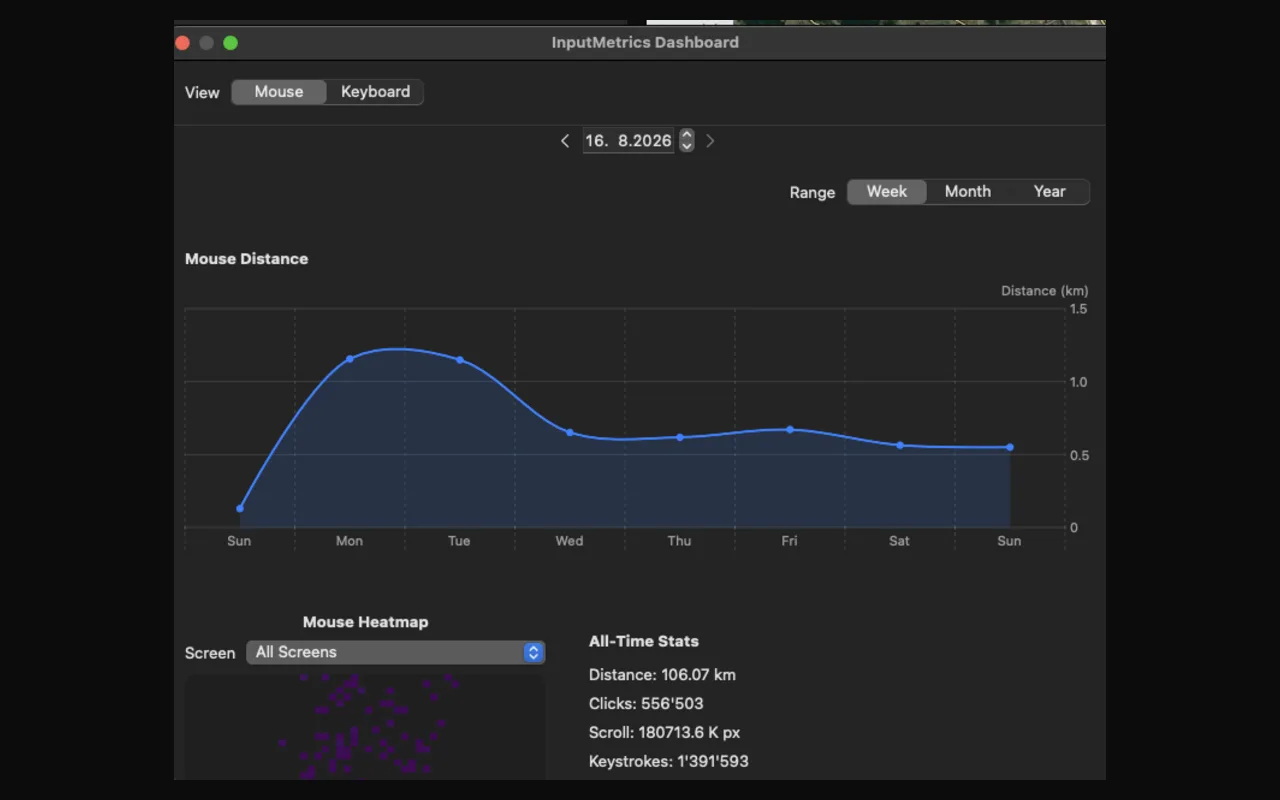
A tap that can only count
Everything the app counts starts at one call. It installs a CGEventTap at the head of the session-level tap list — before any application sees the input, though not the earliest point that exists; the HID-level tap sits below it — and creates it with options: .listenOnly.
That flag is the whole design. A tap created without it can return a modified event, or return nothing at all and swallow the keystroke. A listen-only tap is handed the event and its return value is discarded by the window server. The callback does return the event, out of habit, but nothing reads it. This tap cannot rewrite or drop a keystroke.
It is worth being precise about what that does and does not buy you, because it is tempting to oversell. .listenOnly is an argument the app passes to itself, one token away from .defaultTap, and the same Accessibility grant that lets tapCreate succeed at all would let a filtering tap succeed too. So this is not a cage the operating system puts the app in. It is a promise written in code rather than in a policy document — checkable by anyone reading the source, and worth more than a paragraph on a website for exactly that reason, but a promise all the same.
It asks for six event types and no others: mouse moved, left, right and other mouse down, key down, and scroll wheel. There is no keyUp, so the app cannot time how long a key was held, and no flagsChanged, so it never sees a modifier pressed on its own.
One wrinkle that any long-lived tap has to handle: macOS disables a tap whose callback takes too long, and tells it so by delivering a tapDisabledByTimeout event. The same happens on tapDisabledByUserInput. Both are caught in the callback, which re-enables its own tap from inside itself and returns — so the only notification that the app nearly died is the thing that revives it.
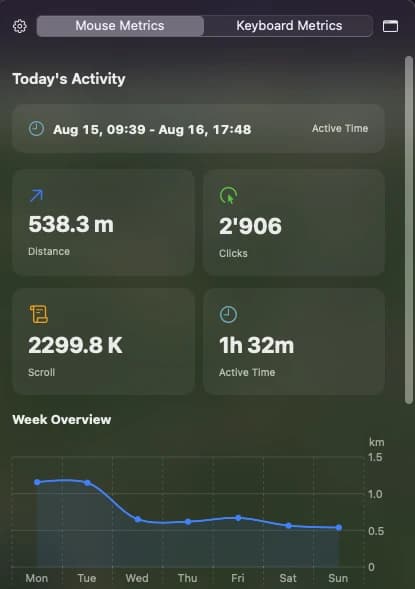
Sandboxed, which its own website denies
The project’s landing page says twice that the app runs outside the App Sandbox, and that this is required for CGEventTap. Both halves are wrong. The shipping entitlements enable the sandbox, and the sandbox was never what gated the tap.
What gates it is TCC, which is a separate mechanism entirely: Accessibility and Input Monitoring, granted per-app in System Settings. The two are not interchangeable. Without Accessibility, tapCreate returns nil and there is no tap at all. Without Input Monitoring the tap is created quite happily, mouse events flow, and keyboard events are silently dropped. Either way a sandboxed app gets its tap once the grants are there; the sandbox never enters into it.
That asymmetry is what the app leans on. It never calls CGPreflightListenEventAccess, which has existed since macOS 10.15 and would answer the question directly. Instead it infers the grant from its own traffic: more than fifty mouse events and exactly zero keyboard events means the mouse is arriving and the keyboard is not, which is precisely the shape of Accessibility without Input Monitoring. The heuristic works, and it is a choice rather than a necessity.
There is no notification when a grant lands, though, so a failed tap starts a two-second retry and gives up after thirty attempts — at which point it logs “please restart the app” to the unified log, where nobody will ever read it. That one is just a bug.
The database, meanwhile, lives in the shared App Group container rather than ~/Library/Application Support, which is where the privacy policy still says it is. Tempting to blame the sandbox, but the history says otherwise: the move was made a week earlier, to let a widget read the file from a second process. The sandbox arrived afterwards and would have forced the same outcome anyway.
The schema is the privacy policy
The promise is that the app never records what you type. That promise is not kept by discipline in the event handler; it is kept by there being nowhere to put such a thing. Five tables:
| Table | Primary key | What it holds |
|---|---|---|
daily_summary | (date) | distance, three click counters, keystrokes, two scroll distances, first and last activity, active minutes, three speed columns |
mouse_heatmap | (date, screen_id, bucket_x, bucket_y) | one click count per bucket |
keyboard_heatmap | (date, key_code, modifier_flags) | one press count |
hourly_summary | (date, hour) | distance, clicks, keystrokes |
app_usage | (date, bundle_id) | keystrokes and clicks per application, its display name, and an active_seconds column nothing has ever written to |
Nothing records which keystroke followed which. Every row is a counter under a key that is some combination of a date, a key code, a bucket or a bundle identifier, and counters commute — so the order the increments arrived in is gone by the time they are written. What you type cannot be reconstructed from a schema that only ever adds one to things. Nine numbered migrations got it to that shape: five that added a table, four that bolted columns onto the daily summary.
It is worth resisting the stronger version of that claim, which is the one I first wrote: that nothing anywhere is finer than a day. Three things are. hourly_summary is keyed by the hour, so the shape of a working day is recoverable. daily_summary keeps a first and last activity timestamp to the minute — only the two endpoints, but those are minutes. And because none of the tables are declared WITHOUT ROWID, SQLite quietly assigns each row an insertion order, so the sequence in which distinct keys were first pressed on a given day survives even though nothing intended it to. None of that recovers content. It is still more than “counts, by day”.
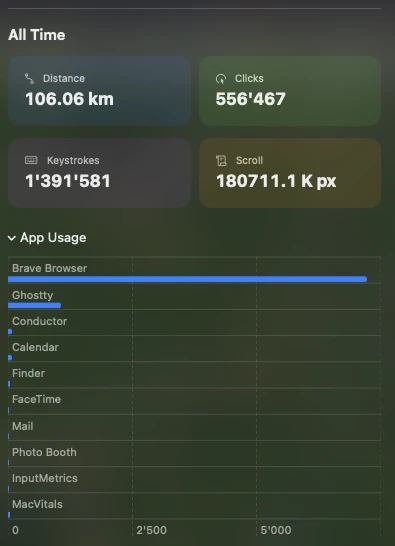
One correction to the privacy policy, too. Application names are listed there under data that is not collected. app_usage stores the bundle identifier and the display name, and the popover draws the names in a bar chart. Counting keystrokes per app is a reasonable feature and it is visibly in the product; it just belongs on the other list.
A keycode is a position, not a letter
A macOS virtual keycode does not name a character. It names a physical position on a US ANSI keyboard. kVK_ANSI_Y means “the key where Y sits on an ANSI board” — and on a German board, that position is the Z key. So the mapping table contains the two lines that carry the entire idea:
| Keycode | Rendered as |
|---|---|
kVK_ANSI_Y | Z |
kVK_ANSI_Z | Y |
The database therefore stores positions, and the letter is a decision made at draw time. Which is the right way round: the same rows can render as a different keyboard depending on what layout the app thinks you are using.
Except that it never decides. KeyCodeMapping.detectCurrentLayout() exists, queries the current input source and classifies it as QWERTY, QWERTZ or AZERTY — and the entire codebase contains exactly one reference to it, which is its own definition. It is never called. The layout is hard-coded, and it is specifically a German one — not the Swiss German board you might expect from the author, on which five of these keys are also wrong.
For anyone on an ANSI keyboard it is not the two swapped letters that give it away, it is everything else: eleven positions render glyphs that are not on their keyboard. ß where the hyphen is, Ü and Ö and Ä around the brackets and the semicolon, a caret where the backtick lives, and a phantom extra key beside the left shift that ANSI boards do not have at all. The counts underneath are correct — they are positions, and positions are what was recorded. It is only the drawing that assumes.
The modifier flags are masked down to the four that matter before they become part of the primary key, so ⌘S and a bare S are separate rows rather than the same one.
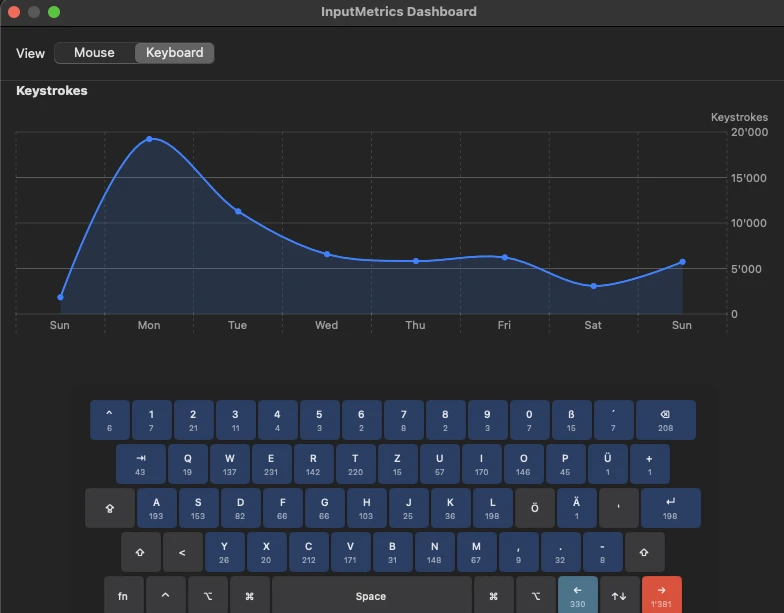
Worth noticing in that heatmap: the most-pressed key of the day is not a letter. It is the right arrow, ahead of space by roughly three to one. Counting keystrokes turns out to measure moving a cursor around text at least as much as it measures writing any.
A pixel is not a metre
The headline feature is cursor distance in real-world units, and it rests on a conversion that is an estimate in three separate ways.
The density comes from dividing a display’s width in points by its physical width, which macOS reports via CGDisplayScreenSize in millimetres, straight out of the monitor’s EDID. Plenty of external monitors report that wrongly, and some report zero — which falls back to a flat 110 PPI, or 4330.7 points per metre.
It is read from whatever AppKit calls NSScreen.main, which is not the primary display but the one with the focused window, and then applied to distance accumulated across every display. On a laptop beside a wide external monitor those densities differ by enough to matter, so which window you happened to be typing in decides how far the app thinks you moved.
Then there is a second constant. Three places in the app skip the query entirely and hard-code 4330.0: the menu bar title, the distance goal, and the widget. Only the popover and the dashboard actually measure. So the app disagrees with itself on every machine — not only the ones that are not 110 PPI, because 4330 and 4330.7 are not the same number either. The most visible figure the app shows, the one in the menu bar, is the one that never asks.
The widget is a special case, and a tidy illustration of how easily this happens. There is a complete WidgetKit extension in the repository, reading the shared database from its own process — and it is not a target in the Xcode project, so nothing builds it and no extension is embedded in the app you can download. It has been drifting out of sync with a converter it never runs against, in a product it is not part of.
What is accumulated underneath all this is the straight-line distance between consecutive mouse-moved events, which undercounts curves, measured in CoreGraphics points rather than device pixels. Pairing points with a points-derived density is at least self-consistent, but it does mean the number labelled pixels is really points.
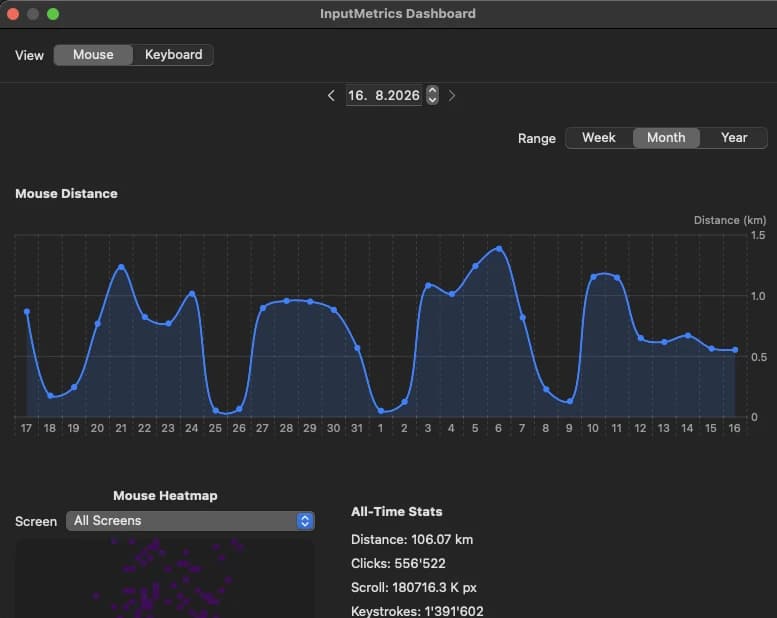
A hundred and sixty days
The app has been running on one Mac since March. Rounded, because the precision is nobody’s business:
| Metric | Total |
|---|---|
| Keystrokes | ~1.39 million |
| Clicks | ~556,000 |
| Cursor travel | ~455 million points |
| Active time | ~156 hours |
| Days recorded | 160 |
At the fallback density that distance is a little over 100 km, which the app renders as 0.26% of the way around the Earth. The format string carries five decimal places, because at any realistic amount of mousing the honest answer is otherwise 0.00%.
Two metrics that are wrong
Peak words per minute is computed on every keystroke, over a rolling sixty-second window of timestamps, as the count divided by the span between the first and last of them, times sixty, over five characters per word. It is then latched with a maximum, and latched again by the upsert that writes it, which only ever overwrites a smaller value with a larger one.
The guard is that there are at least two timestamps and that the span between them is greater than zero. Two is the arithmetic minimum, so in practice the only real constraint is that the span is not exactly zero — there is no floor on it. Two timestamps δ apart therefore give 24/δ words per minute, and a pause longer than a minute empties the window, so any two keystrokes in quick succession after one are enough. A key repeat will do it. A chord will do it.
| Gap between two keystrokes | Recorded WPM |
|---|---|
| 100 ms | 240 |
| 10 ms | 2,400 |
| 1 ms | 24,000 |
The highest figure in this database is 31,007, which needs a gap of about 774 microseconds. Strictly it needs a ratio: three keystrokes spanning 1.16 ms give the identical number, and nothing durable records how many samples were in the window. The words-per-minute figure is real and stored; the gap is only what two keystrokes would have had to be. Either way, once a value like that is latched it never comes out again.
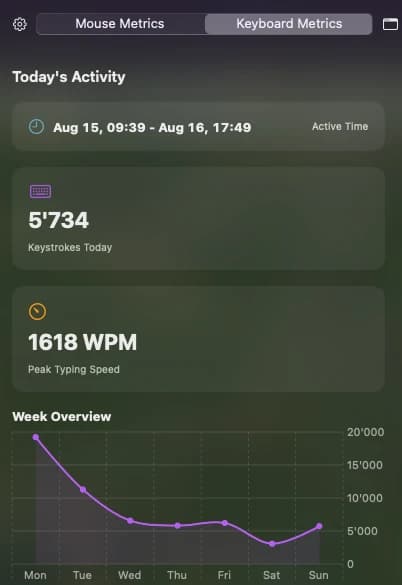
Nor is it rare, which is the part that matters. The app puts this number on the front of the Keyboard card, labelled Peak Typing Speed, and on 121 of the 160 days recorded it reads above 500 words per minute. The world record is around 220. The screenshot below is an ordinary afternoon.
The same mistake is in the file next door. Peak mouse speed is distance over elapsed time, and the guard is elapsed > 0 && elapsed < 1.0 — which correctly stops a long pause fabricating a huge speed, and does nothing at all about a very short one.
Which gives the cleanest statement of the whole problem. Over the same rows, the average mouse speed is about 1,800 points per second, and the peak is 64.9 million. A mean survives one bad sample; a maximum is defined by it. Both peaks are garbage, and permanently so, because nothing ever recomputes them from the data that is still sitting there.
Shipping it
Ten weeks of work: 352 commits, 133 merged pull requests, 95 feat: and 79 fix:. The release pipeline is the same one the other menu bar app uses, and pointing it at a project this size shows up its seams.
The tag action bumps a version once per push, not once per commit — which is why 95 feature commits produced thirteen minor versions rather than ninety-five. Publishing the release that triggers the build is manual. So:
| Count | |
|---|---|
| Tags cut | 47 |
| Releases published | 28 |
| Releases with a downloadable build | 11 |
The gap from 47 to 28 is the manual step — nineteen tags that carry no release today. The gap from 28 to 11 is the build failing, and failing a lot: across thirty-nine runs of the release workflow, twenty-eight failed and eleven succeeded. So seventeen of the twenty-eight published versions are a tag and a changelog with nothing attached. Fixing the release workflow is its own little archaeology in the log — swapping one DMG tool for another, adding a flag to get pip3 to install anything at all, decoding the provisioning profile, and eventually giving up on sed for the Xcode project rewrite in favour of perl.
Development ran from mid-January to the end of March, but every published release lands in the last two weeks of it. The first eight weeks produced no installable artefact at all.
Underneath, the write path is deliberately dull. Counters live in memory and flush on a thirty-second timer, on sleep, and on quit. The mouse heatmap is genuinely bounded — coordinates are clamped into a 50×50 grid, so 2,500 buckets per screen per day is a ceiling by construction. The keyboard map is not: a comment puts it at about a hundred keys, but the key is a pair of code and modifiers, so the real ceiling is a few thousand. What actually keeps it small is the flush.
The counter columns accumulate rather than overwrite, which is what makes a missed flush cost at most thirty seconds instead of a day. Four tables do that with ON CONFLICT … DO UPDATE SET x = x + excluded.x; the hourly summary does it the older way, reading the row and writing it back inside the transaction. The non-counter columns behave differently and it is worth knowing which: timestamps are coalesced so the first one wins, the average speed is simply replaced, and the two peaks are max-latched — which is precisely how they got stuck.